


The Ubiquity of AI in Productivity Software
The integration of artificial intelligence into everyday productivity tools, such as Google Docs, is accelerating, presenting both opportunities for enhanced efficiency and potential disruptions to user workflows. A recent user experience highlights the challenge of managing intrusive AI prompts within familiar digital environments.
Navigating AI Overlays in Google Docs
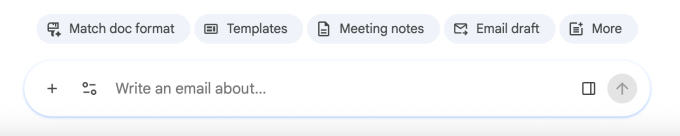
Upon opening a Google Document, users may be greeted by an unsolicited prompt to “write with Gemini.” For those seeking to focus on content creation without immediate AI intervention, the discovery of how to dismiss or disable these prompts can be a point of friction. Initial attempts to close the AI interface may prove unhelpful, merely collapsing the active AI conversation rather than deactivating the feature entirely.
Disabling the Gemini Bottom Bar
A direct method to mitigate the persistent AI presence involves adjusting document-specific settings:
- Access the “Gemini” menu option located in the top toolbar of the Google Document.
- Within the dropdown, select “bottom bar preferences.”
- Users can then opt to disable the bottom bar, thereby removing the AI interface from the document view.
Global Workspace Settings for AI Features
For a more comprehensive approach to managing AI integrations across Google’s suite of productivity applications, users can adjust settings within Gmail. This allows for a broader control over “smart features” that may extend beyond individual documents.
- Navigate to the Gmail interface and access the main Settings menu via the gear icon.
- Select “See all settings” to access the full range of configuration options.
- Within the settings, locate the section pertaining to “Google Workspace smart features.”
- Click on “Manage Workspace smart feature settings” to access granular controls.
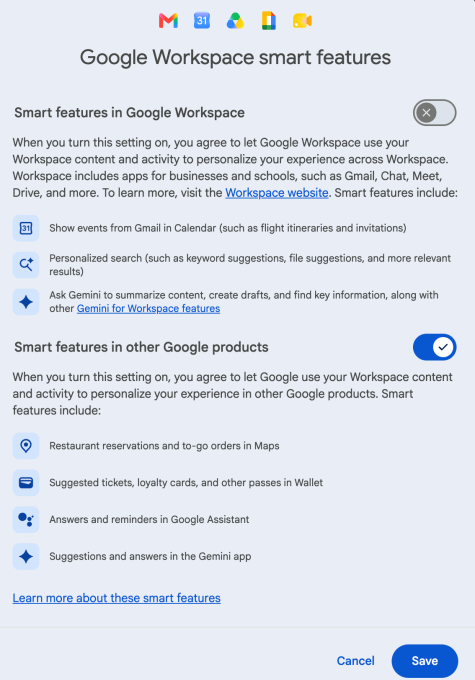
Within this management interface, users can disable “smart features” across Google Workspace. This proactive configuration allows individuals to tailor their experience, ensuring that AI assistance aligns with their preferred working style and avoids unwanted interruptions.
Business Style Takeaway: The increasing pervasiveness of AI in productivity suites necessitates user control over feature integration. Businesses must consider the impact of AI’s embedded presence on employee workflows and provide clear guidance on customization to optimize productivity and user satisfaction in an AI-augmented workplace.
Learn more at : techcrunch.com